
How to use ASP & Sending Mail with CDO.Message (Form Upload & Attachment file) This is learn/tutorial asp developers how to using ASP script Sending Mail with CDO.Message (Form Upload & Attachment file)
ShotDev Focus:
- ASP & Sending Mail with CDO.Message (Form Upload & Attachment file)
Example
asp_cdomessage_upload_attachment1.asp
<html> <head> <title>ShotDev.Com Tutorial</title> </head> <body> <form action="asp_cdomessage_upload_attachment2.asp" method="post" enctype="multipart/form-data" name="frmMain"> <table width="343" border="1"> <tr> <td>To</td> <td><input name="txtTo" type="text" id="txtTo"></td> </tr> <tr> <td>Subject</td> <td><input name="txtSubject" type="text" id="txtSubject"></td> </tr> <tr> <td>Description</td> <td><textarea name="txtDescription" cols="30" rows="4" id="txtDescription"></textarea></td> </tr> <tr> <td>Attach</td> <td><input name="Attach" type="file"></td> </tr> <tr> <td> </td> <td><input type="submit" name="Submit" value="Send"></td> </tr> </table> <br> <br> <br> </form> </body> </html>
asp_cdomessage_upload_attachment2.asp
<html>
<head>
<title>ShotDev.Com Tutorial</title>
</head>
<body>
<%
Dim myMail,HTML,strTo,strSubject,strDescription,strFileName

Dim mySmartUpload
'*** Create Object ***'
Set mySmartUpload = Server.CreateObject("aspSmartUpload.SmartUpload")

'*** Upload Files ***'
mySmartUpload.Upload

'*** Upload file1 ***'
If mySmartUpload.Files("Attach").FileName <> "" Then
mySmartUpload.Files("Attach").SaveAs(Server.MapPath("MyFiles/" & mySmartUpload.Files("Attach").FileName))
End If

strTo = mySmartUpload.Form("txtTo")
strSubject = mySmartUpload.Form("txtSubject")
strDescription =  Replace(mySmartUpload.Form("txtDescription"),vbCrLf,"<br>")
strFileName = Server.MapPath("MyFiles/"&mySmartUpload.Files("Attach").FileName)

myMail.AddAttachment strFileName

myMail.From = "[email protected]"
myMail.ReplyTo ="[email protected]"
myMail.To   = "[email protected]"
myMail.Subject = "My Subject"
myMail.HTMLBody = strDescription

myMail.Send

Response.write ("Mail Sending.")

Set mySmartUpload = Nothing
Set myMail = Nothing
%>
</body>
</html>
Create a asp file and save to path root-path/myasp/
Run
http://localhost/myasp/asp_cdomessage_upload_attachment1.asp
Screenshot
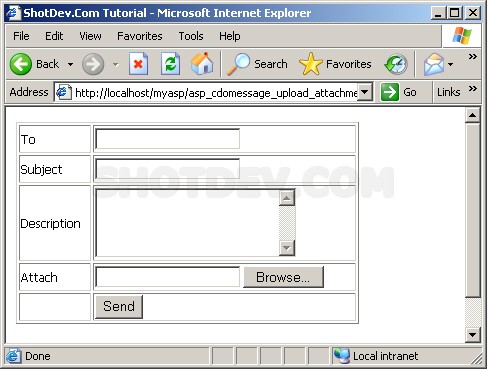
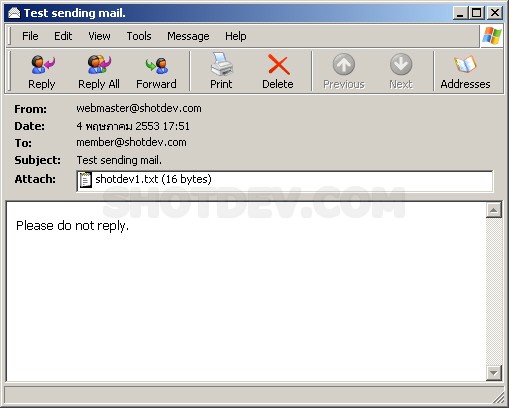
.
.
.
Download this script.



 Loading ...